


/icon%209.svg)
/icon%2010.svg)
/icon%2011.svg)
/icon%2012.svg)
/icon%2013.svg)
/icon%2014.svg)


If your website has one homepage and a handful of general practice area pages, you are competing for local clients with one hand tied behind your back, and most firm owners do not even realize it.
Here is the math worth sitting with. Nearly half of all Google searches, 46%, are looking for something local, and close to half of all searchers now add the words "near me" to what they type. Yet 58% of local businesses still have not optimized their website for local search, and only 30% have any real plan to capture that traffic. That gap, between what people are actually searching for and what most firms have built, is exactly where location pages come in. It is also the biggest reason some firms quietly dominate a city while a nearly identical competitor down the street stays invisible.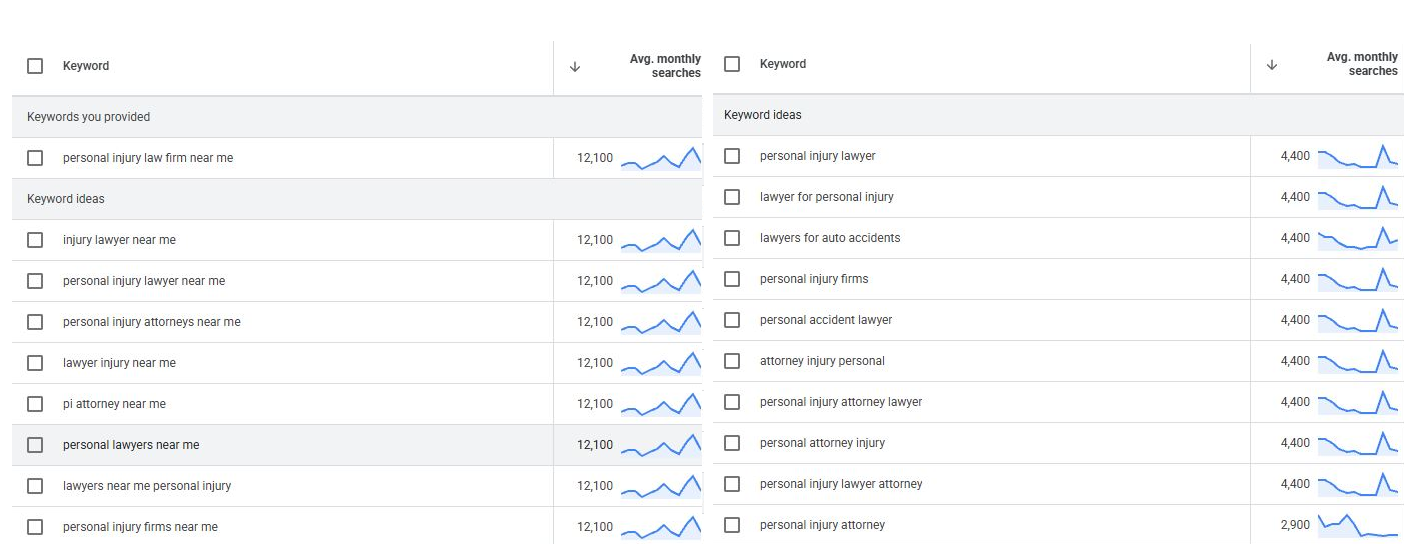
You do not have to take that on faith. Pulling search volume directly from Google's own keyword planning tool for South Carolina shows the gap in plain numbers. A generic search like "personal injury lawyer" gets about 4,400 searches a month, and most of its close variations, "lawyer for personal injury," "personal injury firms," "personal accident lawyer," sit at that same 4,400 figure. Now add the words "near me." "Personal injury lawyer near me" gets about 12,100 searches a month, nearly three times as many, and that same 12,100 figure holds across almost every "near me" variation: "injury lawyer near me," "personal injury attorneys near me," "pi attorney near me." People are not occasionally adding "near me" to their search. For this practice area, it is the dominant way they search, by a margin of roughly three to one.
What Is a Location Page, Exactly?
A location page, sometimes called a hyperlocal page, is a separate page on your website built for one specific city, town, or neighborhood, rather than one page trying to speak to your entire state or region.
Instead of a single "personal injury lawyer" page trying to rank everywhere at once, a firm might build a separate page for "personal injury lawyer in Marietta," another for "personal injury lawyer in Roswell," and so on. Each page becomes its own front door into the firm, built for one specific place.
Why One Homepage Isn't Enough Anymore
Google decides who shows up in local search results based mainly on three things: how closely you match what someone searched for, how physically close your office is to the person searching, and how well known and trusted your firm appears online.
A single homepage can be a good match for a search, but it cannot be physically close to five different cities at the same time. Location pages solve that problem directly. They tell Google, city by city, exactly where you actually serve clients.
The payoff shows up in real click behavior. Law firms that land in the three map results Google shows at the very top of a local search (often called the "map pack") capture about 70% of all clicks on that search. Those same top three results get clicked roughly 44% of the time combined. And when someone searches with local intent, it leads to a real action, a phone call, a visit, or a request for a consultation, within 24 hours about 76% of the time. This is not casual browsing traffic. These are people who already need a lawyer and are deciding right now.
What Happens When Firms Actually Build These Pages
We have real traffic data from two personal injury firms that already do this (names withheld, but the data itself is real), and the pattern is striking.
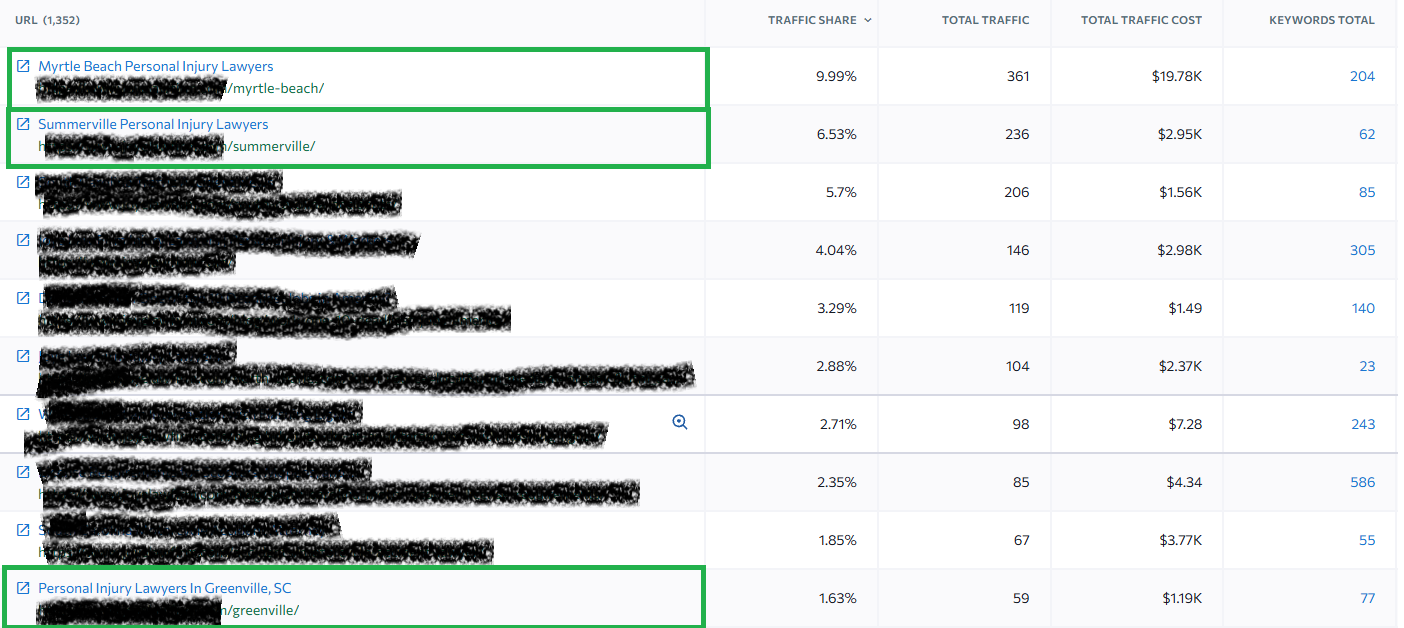
At one firm, out of more than 1,350 pages on the site, the highest-traffic page and the second-highest-traffic page are both location pages. A page built for Myrtle Beach alone brings in nearly 10% of the entire website's organic traffic, roughly 361 visits a month across 204 different keywords. Right behind it, a page built for Summerville brings in another 236 visits a month across 62 keywords. A third location page, built for Greenville, South Carolina, still ranks inside that firm's top 10 highest-traffic pages sitewide.
At a second firm, out of more than 900 total pages, a single location page for Greenville accounts for close to 7% of total site traffic on its own, 357 visits a month across 218 keywords, making it the second highest-traffic page on the entire website, behind only the homepage. Two more location pages, one for Charleston and one built specifically for car accident cases in Atlanta, also land inside that firm's top five traffic-generating pages.
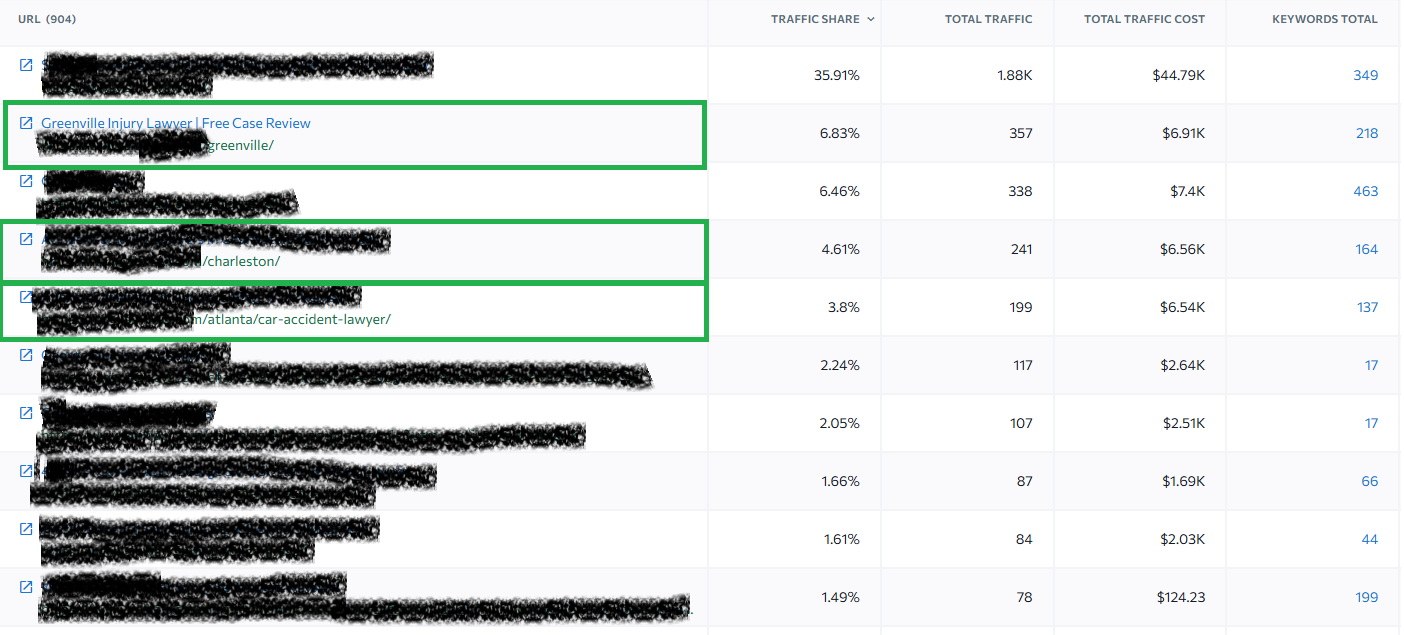
In both cases, out of hundreds or thousands of total pages on the site, a handful of location pages are doing an outsized share of the work. That is not a coincidence. It is the direct, visible result of a firm choosing to build a dedicated page for every city it serves, instead of asking one general page to speak for all of them.
The Part Most Firm Owners Are Missing: AI Search
People are no longer only searching on Google. A growing number are asking AI tools like ChatGPT directly, questions such as "who is a good divorce lawyer in my city?" Recent research found that ChatGPT is now the second most common place people go to research a lawyer, used by about 28% of people, trailing only Google itself. Among younger clients, the ones who will be hiring lawyers for decades to come, this habit is already common.
Here is why that matters specifically for location pages. AI tools do not invent their answers out of thin air. They pull from content that already exists on the internet: web pages, business listings, and other information, to decide who to recommend. If your firm has never published a page that clearly and specifically states you handle divorce cases in that city, the AI has nothing to point to. It will recommend your competitor instead, and you will likely never know you lost that potential client.
The stakes are higher than they first appear. An estimated 60% of people who get an answer from an AI tool never click through to an actual website at all. They simply trust what the AI told them. If your firm is not the one being recommended, you do not just lose a search ranking; you lose the client's entire decision before you ever had a chance to make your case. Even referrals are not fully protected from this shift. About 74% of people who get a personal referral to a lawyer still look the firm up online before hiring them, so a weak or missing local presence can quietly undercut your best word of mouth business too.
One Trap to Avoid
Not every location page helps you. Google specifically penalizes what it calls "doorway pages," meaning near-identical pages built for different cities that only swap out the town name and otherwise say the exact same thing. If your ten location pages are really just one paragraph copied ten times with the city name changed, you are not building trust with Google. You are creating a warning sign that can hurt your rankings across your entire website.
The firms behind the results above did the opposite. Each page had genuinely different, useful content: the name of the actual local courthouse, laws specific to that state or county, real case outcomes from that area, and answers to the exact questions someone in that city is likely to ask.
What a Good Location Page Actually Includes
|
What the page needs |
Why it matters |
|
Its own web address built around the city name (for example, yourfirm.com/locations/marietta) |
Gives Google, and AI tools, a clear, separate signal for each city you serve |
|
Real, local content: the actual courthouse name, relevant state or county laws, real case results from that area |
Avoids the "doorway page" penalty and gives AI tools something genuine to reference |
|
Your business name, address, and phone number listed exactly the same way everywhere, plus a map showing your office |
Confirms to Google that your firm is a real, physically located business |
|
A small piece of background code, usually added by your web developer, that clearly labels your business type and location for search engines |
Makes it easier for Google and AI tools to correctly identify where you are and what you do |
|
Genuine reviews and testimonials from clients in that specific area Builds the kind of trust and credibility |
Google weighs heavily when ranking local businesses |
|
Links to your other city pages and practice area pages |
Helps Google understand your full service area as one connected, trustworthy site |
How to Get Started
-
List every city, county, or neighborhood your firm actually serves clients in.
-
Build one dedicated page per location, with real local details, not a copy and pasted page with only the city name changed.
-
Make sure your business name, address, and phone number are identical across your website, your Google Business Profile, and any legal directories you are listed in.
-
Ask your web developer to add the background labeling code (schema markup) to each new page.
-
Collect and display genuine client reviews from each area you serve.
-
Ask your marketing team or agency to track which location pages bring in the most traffic and calls, then invest further in what is already working.
The Bottom Line
Location pages are not a nice-to-have content project. They are how you show up at the exact moment someone in your service area decides they need a lawyer, whether they are typing into Google or asking an AI tool. The firms already doing this are pulling ahead by hundreds of leads, and in some cases, multiplying their revenue. The firms that are not doing this are losing clients to competitors they may not even know exist yet, and they usually will not find out until the case is already signed elsewhere.
If your firm serves more than one city, county, or neighborhood, and you are relying on a single homepage to represent all of it, that is the gap to close first.